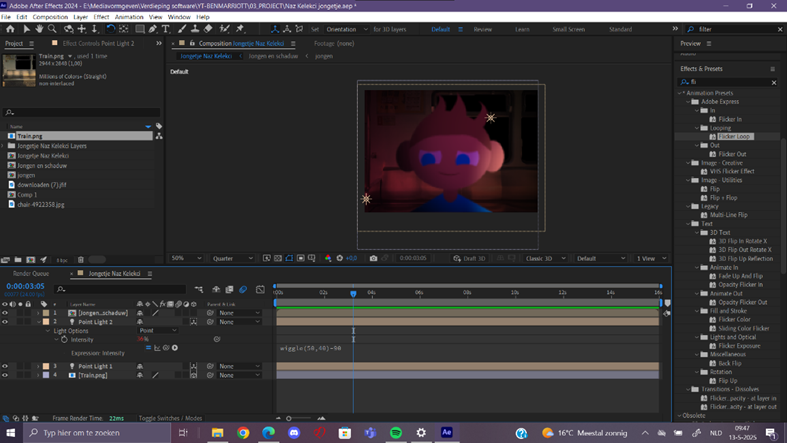
Boy in train
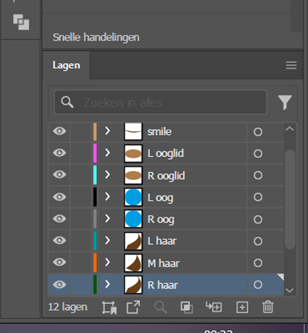
For this project, I’m starting in Adobe Illustrator, designing a young boy as a character. I’m dividing the design into separate layers: the whites of the eyes, the eyelids, the smile, the neck, the torso, the hair strands, and so on. Each element is given a clear name, such as “Eyelid_Left,” to keep everything organized during the animation process. Next, I import the Illustrator file into Adobe After Effects, where I bring the character to life. First, I animate the blinking boy by moving the eyelids and pupils separately from the whites of the eyes. I add emotion to the eyes, for example, by slightly lifting the lower eyelids during a smile. The mouth also moves along, creating a more natural and expressive effect.
Next, I focus on the hair. Each strand of hair moves smoothly and individually because it’s all positioned differently on the head. The ears and the head itself are also separate layers, allowing me to animate them independently. Gradually, I begin to subtly animate the entire body, matching the facial expressions. This gives the character more life and dynamism.

In the next step, I add shadows using masks and solid colors. To maintain clarity while working with many layers, I carefully rename all my files and layers. Finally, I use After Effects’ 3D system to blur the lighting slightly, which adds depth and realism. In this phase, I move on to more complex effects that really test my skills. I compress the boy and place him against a suitable background image of a train. I make extensive use of “ease in,” motion blur, and color correction to give the scene more realistic movement and atmosphere. Using masks, I remove the train window and place a moving cityscape behind it, which adds depth and dynamism.
To make the lighting convincing, I work with 3D light sources. I use three lights: one from the front, one from the back, and a third that moves with the train. I manually animate this final light source and adjust its opacity as it returns to its starting point, creating a realistic, shifting light effect during the train’s journey. I also add a vertical pole in the background, made of a black solid, which passes by at regular intervals to enhance the sense of movement. Finally, I apply a simple expression in After Effects that creates a subtle shaking effect in the background. This makes the scene vibrant and believable, and provides a fitting conclusion to this exercise in combining effects, layers, lighting, and motion.